
Congratulations on the launch of Wyverno Studio — a new professional environment for audio processing, built for those who want to work faster, more precisely, and at scale.
Wyverno Studio expands the capabilities of Wyverno SST and transforms them into a full-fledged tool for regular audio production. Previously, users could quickly transfer the sound style from one audio file to another in Wyverno Lab; now, this approach evolves into a much broader system — with projects, batch processing, a DAW-like interface, effect parameter editing, custom models, and full account-based project storage.
Wyverno Studio is built for scenarios where not only automation matters, but control as well. Artificial intelligence handles the complex part — analyzing reference audio and generating processing parameters — but the final decision always remains with the user. You can review the results, adjust settings, manage the effects chain, and tailor the processing to your specific material.
[Watch the Trailer] | [Wyverno Studio Page]
What is Wyverno Studio
Wyverno Studio is a dedicated workspace for processing, organizing, and creating audio projects. It combines the automated capabilities of Wyverno SST models with practical tools needed for real-world production: bulk file uploads, reference-based workflows, effects management, result saving, reusable models, and final audio export.
The service is designed for users who regularly work with speech, vocals, dubbing, podcasts, demo recordings, social media content, or other audio materials where many recordings need to be quickly brought to a consistent sound. Wyverno Studio is also useful when you don’t just want an automatic result, but need the ability to refine it manually.
Within Studio, there are two main project types: Process Project and Studio Project. They cover different use cases but operate on the same core principle: you select a standard Wyverno SST model or your own custom model, add audio and a reference, and the system generates processing parameters and applies the appropriate effects chain.
Process Project
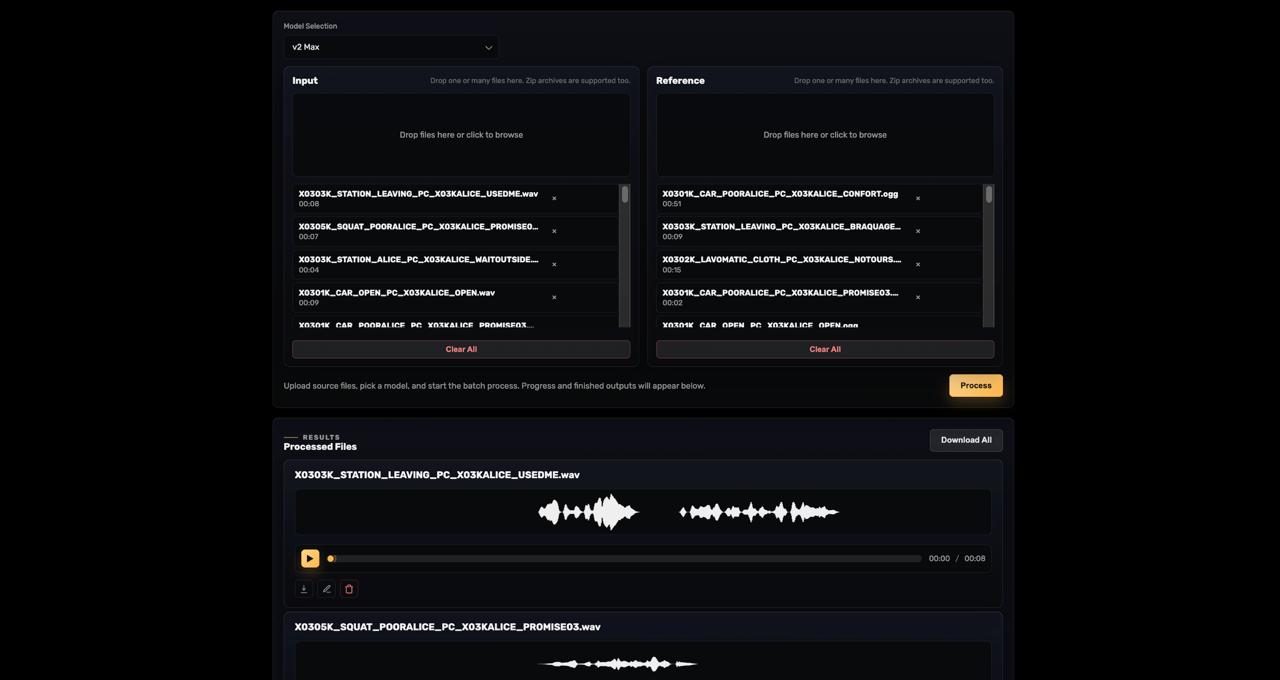
Process Project is a project type designed for fast and efficient batch audio processing. Its main goal is to help process a single file or a large number of files without having to repeat the same steps manually.
The Process Project interface consists of two main upload areas: Input and Reference. Input is where you add the audio files you want to process, while Reference is where you upload the files the system will use to determine the desired sound characteristics. Both individual audio files and archives are supported, which is especially convenient for large datasets.
Before starting the process, the user selects a model. This can be one of the standard Wyverno SST models or a custom model created in the My Models editor. Once processing begins, the system creates a task, displays progress, and stores the completed results within the project.
Processing Modes
Process Project supports several modes, which are automatically determined based on the number of input and reference files uploaded.
1:1 — Single Processing
This mode is used when one input file and one reference file are uploaded. It closely resembles the classic Wyverno Lab workflow, but offers more control: after processing, you can review the result, open the effect parameters, and manually adjust them if needed.
This mode is ideal for focused tasks such as processing a single voice recording, testing a model, comparing references, or preparing a specific audio segment.
N:1 — One Reference for Multiple Files
This mode is used when multiple input files and one reference are uploaded. In this case, each input file is processed relative to the same reference sound.
N:1 is especially useful for unifying large sets of material: dialogue lines, vocal takes, podcast episodes, voiceovers for video, or any audio that needs to sound consistent. Instead of processing each file manually, you run a single batch task and get a consistent result across the entire set.
N:N — Pairwise Processing
The N:N mode is designed for cases where each input file has its own reference. To use it, you need to upload the same number of files into both the Input and Reference sections. Files are matched pairwise based on their order in the list.
This approach is useful for more complex datasets where each recording requires a different target style. For example, one file may be processed using one vocal reference, another with a different one, and so on. To avoid mismatches, it’s recommended to use clear and consistent file naming when working with archives.
Results and Manual Editing
After processing is complete, all generated audio files are stored within the project. You can preview them, download them individually, or prepare them for bulk export. Each result also supports manual editing of effect parameters.
This is a key advantage of Wyverno Studio over fully automated solutions. You are not limited to a single final output — you can adjust the intensity of individual effects, fine-tune EQ, dynamics, reverb, or other parameters available in the selected model. If needed, you can always revert to the AI-generated settings.
Process Project is best suited for scenarios where large volumes of audio need to be processed, and further work will be done in another tool — such as a DAW, video editor, editing suite, or external pipeline.
Studio Project
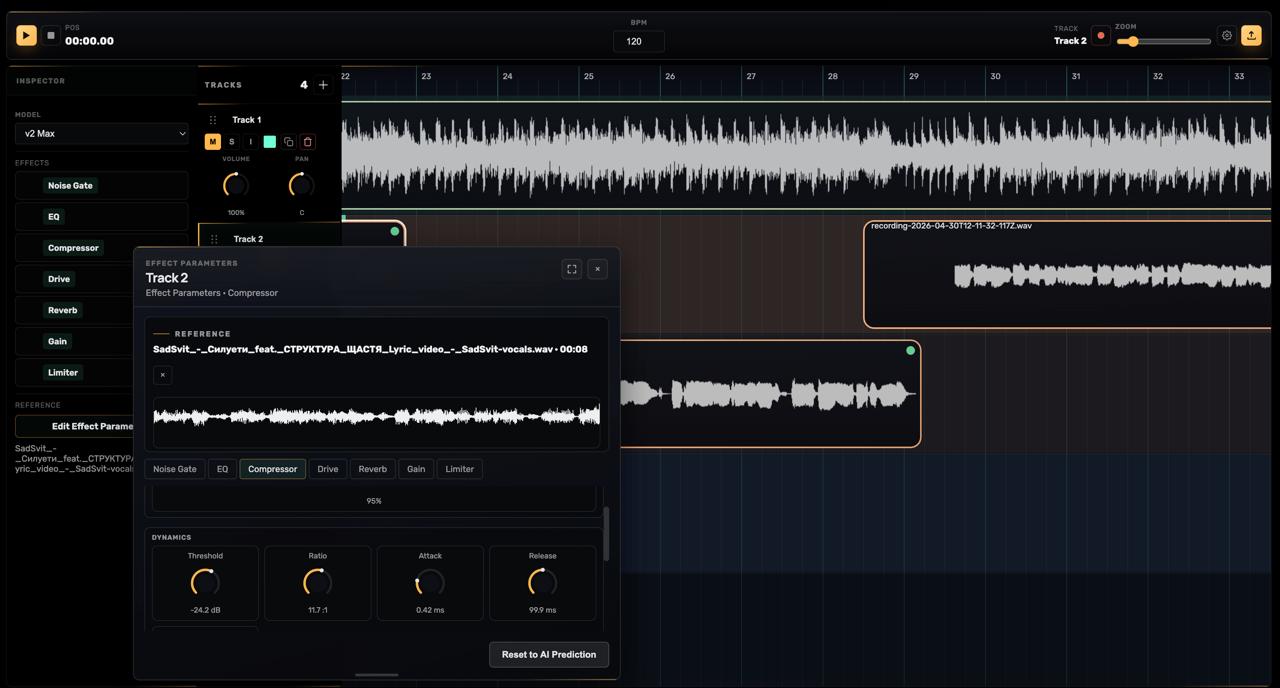
Studio Project is a full-fledged DAW-like environment for creating audio productions from start to finish. In its approach, it is similar to tools like FL Studio, Reaper, or Logic Pro, but with a key difference: deep integration of Wyverno models directly at the track level.
In Studio Project, the user works with a timeline, tracks, clips, a transport panel, BPM, zooming, volume, panning, and other familiar elements of an audio editor. This environment is designed for projects where it’s not enough to just process files automatically — you also need to arrange material over time, record new segments, organize tracks, mix them together, and export the final result.
Working with Tracks
Each track in Studio Project has its own settings. Users can create new tracks, rename them, change colors, adjust volume and panning, enable Mute or Solo, duplicate tracks with all settings, or remove them from the project.
For each track, you can select a Wyverno SST model or a custom model from My Models. The selected model determines which effects will be used to process the audio on that track. After choosing a model, users can add audio clips to the track — either by dragging and dropping files or by recording through a microphone (if supported by the browser and device).
Reference-Based Parameter Generation
The core logic of Studio Project is built around reference audio. For each track, you can open the effects window, upload a reference, select the desired fragment, optionally clean it from unwanted sounds, and then run parameter generation.
The model analyzes the reference and generates parameters for the effects chain assigned to the track. These parameters are then applied to the audio clips on that track. This approach is especially useful when maintaining a consistent style across multiple segments — for example, dialogue lines of a single character, vocal layers, voiceovers, or a series of recordings within one project.
At the same time, users can intervene at any stage. Generated parameters can be opened in a manual editing window, where you can tweak effect values, review settings, or revert back to the AI Prediction if needed.
Inspector and Effects Control
The Inspector panel displays the full list of effects applied to the selected track. From there, you can enable or disable individual effects, open their settings, and change their order in the chain.
This provides greater flexibility when working with audio. For example, you might keep EQ and compression active while temporarily disabling reverb, compare different processing intensities, or rearrange the effect order depending on the material.
Clip Handling and Export
Audio clips on the timeline can be arranged, copied, duplicated, split, deleted, and adjusted through clip properties. Each clip also shows its processing status, allowing you to quickly see whether it is waiting to be rendered, currently processing, completed, or failed.
Once your work is finished, the project can be exported as a final audio file. Studio Project supports export to WAV or MP3, with additional quality settings such as sample rate and bit depth for the respective formats.
Creating Custom Models
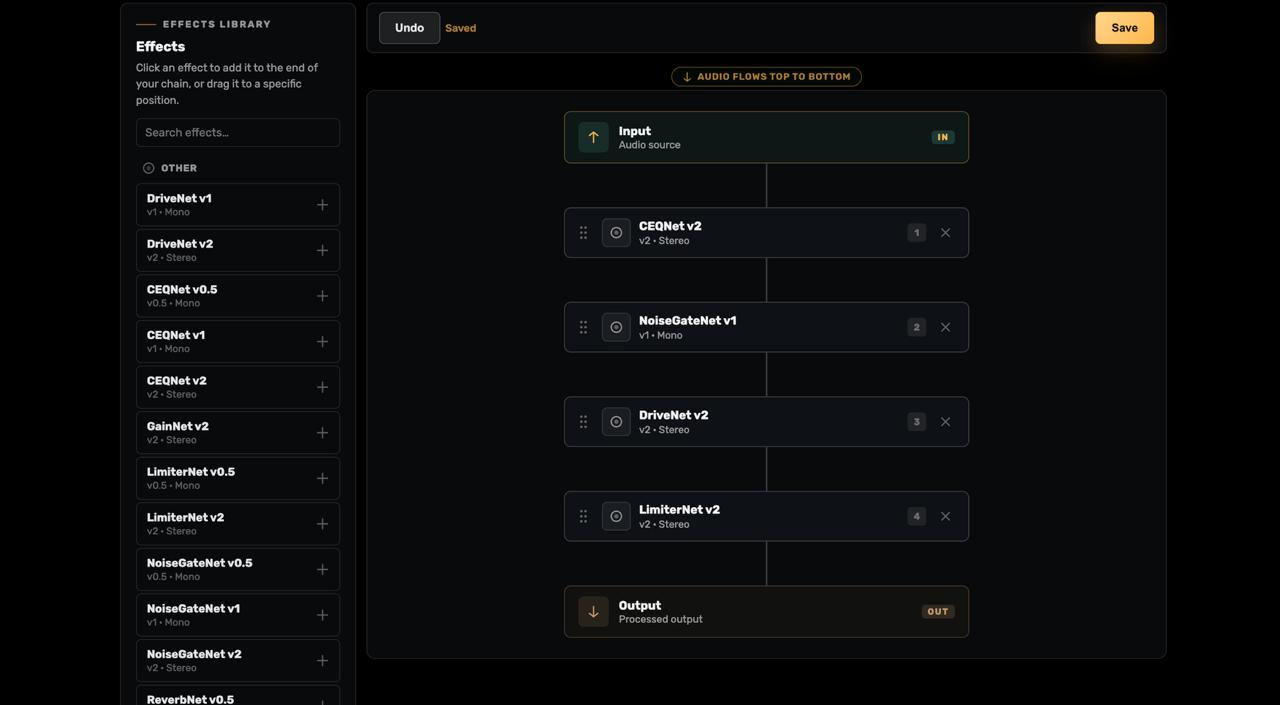
An important part of Wyverno Studio is the custom model editor. It is designed for users who want not only to choose ready-made models, but also to build their own processing chains tailored to a specific workflow and sound.
In Wyverno Studio, a model is made up of modules. A module is a separate neural network responsible for a specific audio effect or a group of parameters. Available modules may include, for example, CEQNet, NoiseGateNet, ReverbNet, LimiterNet, DriveNet, and GainNet. Users can add modules to a chain, combine different versions, change their order, and build their own processing architecture.
The order of modules is critically important. The audio signal flows through the chain from top to bottom, meaning that effects placed earlier are applied first. For example, if an equalizer comes before a compressor, the compressor will process an already equalized signal. If the order is reversed, the final result can be significantly different.
This approach allows both simple and highly complex models to be created. For basic processing, equalization, dynamics, and limiting may be enough. For more expressive sound, drive, reverb, or other effects can be added. The key idea is that the user is not limited to a closed system, but instead gets a flexible tool for defining their own processing logic.
Once saved, a custom model becomes available in the model selection list in any Wyverno Studio project — both in Process Project and Studio Project. This means that a chain created once can be reused for batch processing, timeline-based track work, or experiments with different reference audio.
Projects, Saving and Access
All Wyverno Studio projects are stored within the user’s account. This includes both Process Projects and Studio Projects, as well as any custom models created by the user. At any time, users can return to their work, open previous results, continue editing, duplicate projects, or archive completed sessions.
If a Studio subscription expires or is canceled, projects are not deleted. Access to them may be temporarily suspended until the subscription is renewed, but all data remains محفوظ in the account. This ensures that users can safely return to their work once access is restored.
This approach is especially important for long-term workflows: serialized content, large voice libraries, ongoing studio sessions, or projects that need to be revisited over time.
Who Wyverno Studio Is For
Wyverno Studio is designed for anyone who works with audio regularly and wants to reduce time spent on repetitive tasks without losing control over the final result.
The service can be used for speech processing, dubbing, vocals, podcasts, educational materials, video content, demos, and test production scenarios. It works equally well for fast batch processing and for more detailed work with timelines, tracks, and final export.
The core idea behind Wyverno Studio is to combine the speed of artificial intelligence with professional user control. The model helps generate a high-quality foundation quickly, while the user refines the result to achieve the desired sound.
Summary
Wyverno Studio marks a new stage in the evolution of Wyverno. It is no longer just a tool for one-off audio processing, but a полноцен workspace for projects, models, effects, batch tasks, and DAW-like production.
Process Project enables fast processing of large numbers of files. Studio Project provides a timeline-based environment with full control over tracks, clips, and export. My Models allows users to build custom effect chains and reuse them across different workflows.
Wyverno Studio is built to dramatically speed up your workflow while preserving precision, flexibility, and full control over your sound.
We wish you a productive and enjoyable experience with Wyverno Studio!